

Introduction to Creating your Blog with Blogger
How to Create a Gmail account.
Gmail is a web-based email account provider owned by Google.In this guide, we’re going to show you how to get started with email by creating an account in Gmail.
We are using Chrome as our browser, however other browsers such as Internet Explorer and Firefox will look similar.
You’ll need a computer with internet access of about 3g or 4g network.
Follow these step-by-step instructions to create a Gmail account
Step 1: Open up your internet browser and go to the Google home page: http://www.google.com
Step 2: Click on Gmail at the top right corner of the page.
Step 3: You’ll now be in the ‘Sign in’ section. As you don’t have a Google account yet, you need to create one. Click Create an account.
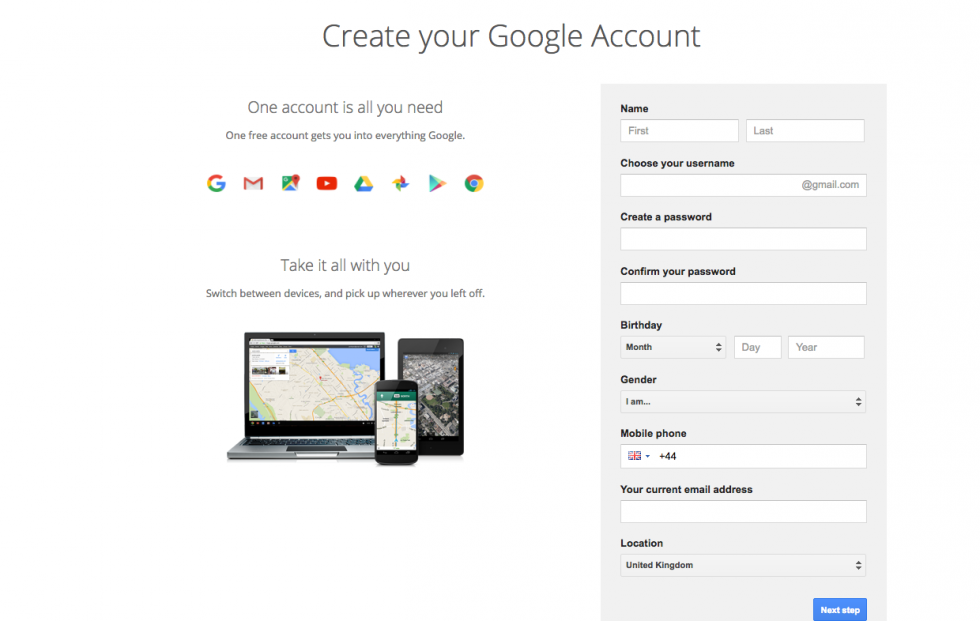
Step 4: To set up your new account, Google needs some information about you – first, your first and last names. The ‘choose your username’ is the unique email address that you wish to use, which will be placed before ‘@gmail.com’. Because it needs to be unique, Google may have to check the availability of any name that you decide on to make sure that no one already has it. Type an email name into the ‘choose your username’ box and then fill out the rest of your information. You will need to ensure that the ‘I agree to the Google terms of service and Privacy Policy’ is ticked. Then click next step.
Step 5: If the email name that you requested in is not available, you’ll get a message saying that somebody already has that username and offering you some alternatives. You can decide to accept one of the alternatives or type in another name and check its availability once more. You will have to complete some of the other boxes again. You may have to do this a few times. Once you finalize your email address, it’s a good idea to make a note of it so that you can refer to it until you remember it.


0 comments:
Post a Comment